Reviews
Chibi Color Cards: Festive Art Studio offers a wonderful creative outlet for children. The adorable chibi heroes and animals are fun to color, and the easy-to-use tools make it accessible for all ages. The ability to turn artwork into greeting cards adds a meaningful, shareable element that families will appreciate. A wholesome, engaging experience.
About this game
Game Introduction
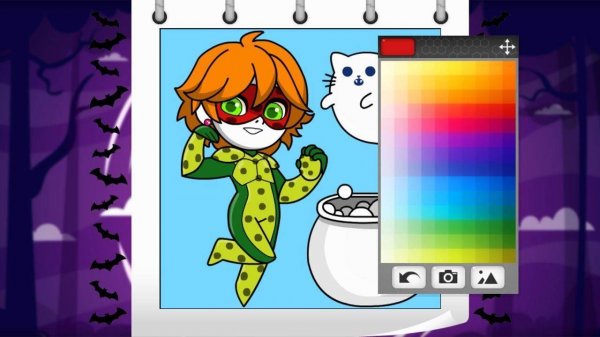
Chibi Color Cards: Festive Art Studio invites young artists into a cheerful digital studio where creativity meets the festive spirit of the season. This game offers a safe and engaging space for children to design personalized greeting cards by coloring adorable chibi-style superheroes and funny animals. The core objective is to bring black-and-white outlines to life with vibrant colors, turning each artwork into a festive card ready to share with family and friends. What makes this game unique is its focus on combining art with playful themes, allowing kids to express themselves while celebrating in a wholesome way.
How to Play
Players typically start by browsing a gallery of cute chibi heroes and animals to select their favorite character. Once a character is chosen, they can pick from a bright palette of digital coloring tools. The gameplay involves tapping or clicking on different areas of the picture to fill them with chosen colors, watching the outline transform with each artistic choice. After completing the masterpiece, players can use a built-in screenshot feature to save their creation. This simple and intuitive process makes it easy for children of all ages to enjoy and share their artwork as unique greeting cards.
Game Features
This game includes a collection of cute chibi superheroes and animals that players can color. It features a festive theme with outlines that capture the playful spirit of the holiday. The coloring tools are designed to be easy to use, with a bright palette of colors. Additionally, the game functions as a creative greeting card maker, allowing players to turn their colored pictures into personalized cards. A simple screenshot sharing feature is also available for saving and sending artwork to friends and family.
Tips for Success
To get the most out of the game, encourage children to experiment with different color combinations to make their characters stand out. Taking time to carefully fill each area can help create a neat and polished final artwork. Using the screenshot feature right after finishing allows for easy sharing and keeps a record of all creations. Exploring all available characters can provide variety and inspiration for future projects. Most importantly, let imagination guide the process, as there are no right or wrong choices in coloring.
Compatibility
✅ Works on PC & Mobile | Recommended: Chrome / Safari / Edge
Advertisement
Faq
Is Chibi Color Cards: Festive Art Studio free to play?
The game is designed as a casual family activity and is typically available for free with optional in-app purchases for additional color palettes or character packs. Check the app store listing for specific pricing details.
Can I print the cards I create in the game?
The game includes a screenshot feature to save your artwork, which you can then print using your device's standard photo printing options. This allows you to create physical greeting cards at home.
What age group is this game suitable for?
Chibi Color Cards: Festive Art Studio is designed for children aged 4 to 12. The simple tap-to-color interface and cute character designs make it accessible for younger kids, while older children can enjoy more detailed coloring.
Does the game require an internet connection to play?
The core coloring and card creation features can be enjoyed offline. However, sharing your creations via screenshot or accessing new character packs may require an internet connection.
Are there any time limits or scoring in the game?
No, the game is a relaxed creative experience with no time limits, scores, or competitive elements. Children can color at their own pace and focus on artistic expression without pressure.
Can I save my unfinished work and come back later?
The game may include an auto-save feature that preserves your current coloring progress when you exit. This allows you to complete your artwork over multiple sessions without losing your work.